
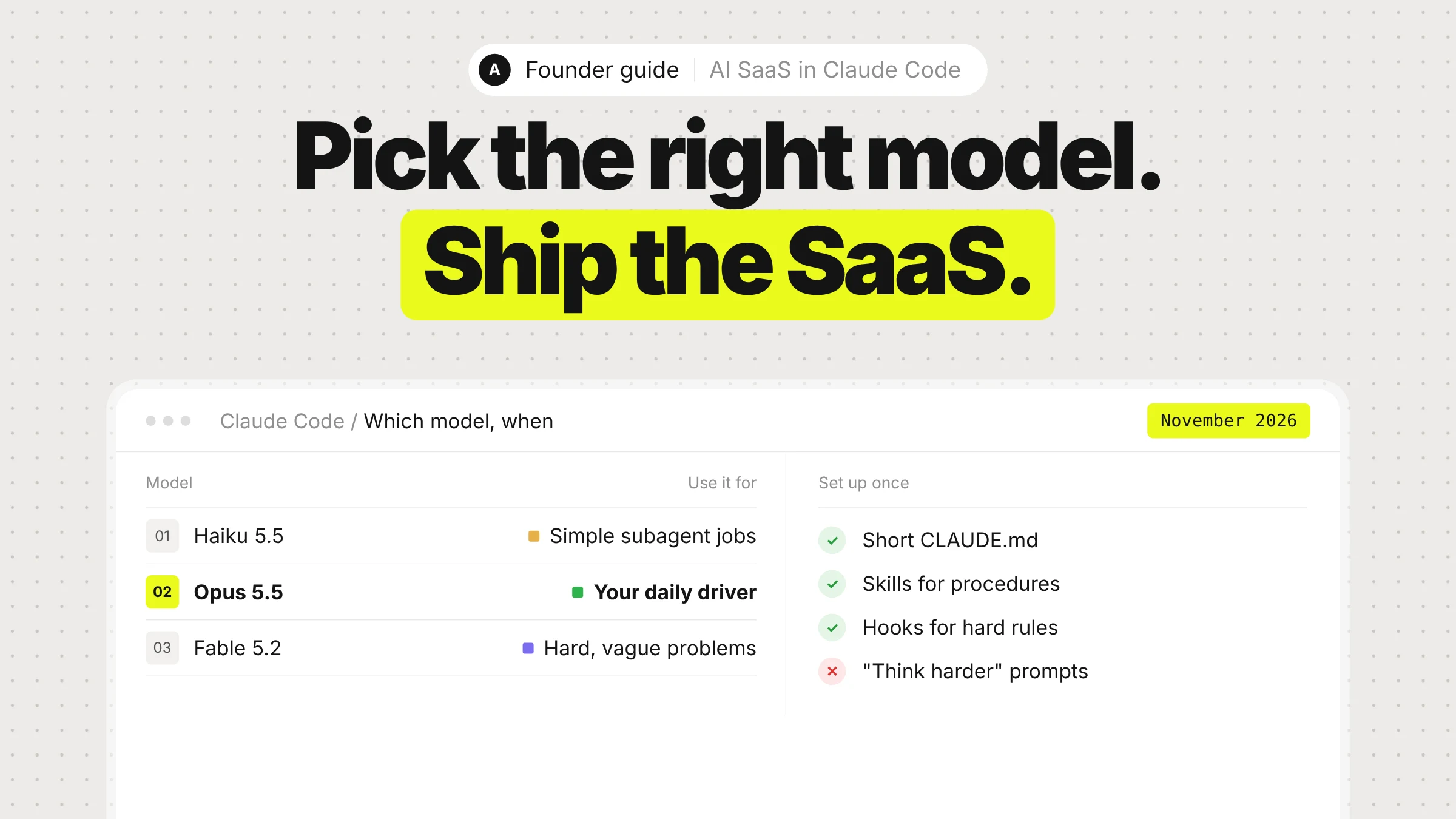
If you are starting an AI SaaS in Claude Code in November 2026, the short version is this: build on Claude Opus 5.5 at the default medium effort, raise effort only for the tasks that need it, switch to Claude Fable 5.2 for the few problems that are genuinely hard and vague, and spend your setup time on three things Claude can't work out alone: what "done" means, how to check it, and what it must never touch.
Most of the advice you will find online was written for older models. A lot of it now makes results worse, not better. This guide covers what to use, what to skip, and the setup we use when we build AI products for founders.
Everything below is current as of November 13, 2026: Claude Opus 5.5 shipped on September 22, 2026, and Claude Fable 5.2 on November 9, 2026.
The short answer
| Decision | Use | Skip |
|---|---|---|
| Daily model in Claude Code | Claude Opus 5.5 (the default) | Switching models every task |
| Hard, ambiguous problems | Claude Fable 5.2, picked by its full name | Fable for routine features |
| How hard Claude thinks | /effort, plus ultrathink for one tricky turn | "think hard", "be thorough", ALL CAPS |
| Project memory | A short CLAUDE.md with commands and gotchas | Describing your folder structure |
| Repeatable procedures | Skills in .claude/skills/ | Long how-tos pasted into CLAUDE.md |
| Rules with zero exceptions | Hooks and deny rules | "NEVER" in a prompt |
| Knowing it works | Tests, a typecheck, /verify, /code-review | Trusting "all done" |
| Models inside your product | Opus 5.5 by default, Sonnet 5.5 or Haiku 5.5 per route | One big model for every call |
Which model to build with
Claude Opus 5.5: your daily driver
Opus 5.5 is the default model in Claude Code on Pro, Max, Team and Enterprise plans and on the Anthropic API. Anthropic calls it its "strongest daily driver", and for an early-stage SaaS it is the right model for almost everything: scaffolding the app, auth, billing, the AI features themselves, and the hundred small fixes after launch.
What matters for a founder:
- It is cheaper than the model it replaced. On the API it costs $4 per million input tokens and $20 per million output, against $5 and $25 for Opus 5. Anthropic says it costs about 40% less to run than Opus 5 on typical workloads, and its output is more than 30% faster.
- It is strongest on long, sprawling jobs. Anthropic's launch examples include a 680,000-line migration finished in under a day. For you, that means "build the whole onboarding flow" is a reasonable single request.
- It runs at medium effort by default. That is enough for everyday feature work with a clear scope. Raise it when getting it right depends on edge cases you could easily miss (more on effort below).
- It has a 1M-token context window. Running out of context is rarely your problem anymore.
Claude Fable 5.2: for the hard, vague problems
Fable is the tier above Opus, built for the most ambitious, open-ended technical work. Fable 5.2 costs $8 per million input tokens and $40 per million output on the API, less than Fable 5.1, and generates output up to 30% faster than it.
Use it when the problem is hard and poorly defined:
- Designing the data model for a product with messy, overlapping concepts
- An agent pipeline that keeps failing in ways nobody can explain
- A large rewrite where engineering judgment matters more than typing speed
Early users describe Fable 5.2 as especially capable on ambiguous engineering work. On Anthropic's FrontierCode 2.0 results, Fable 5.2 at high effort scored about the same as Opus 5.5 at max effort, at roughly half the cost per task.
Don't use it for routine work. Anthropic itself recommends starting with Opus 5.5 for most coding and moving up to Fable only for harder work. On many plans Fable draws on a capped share of your usage (up to 50% of weekly limits on Pro and standard Team seats), and depending on your plan, Claude Code may bill Fable to usage credits and ask before it does.
How to pick it in Claude Code: type /model claude-fable-5-2. Use the full name. The short alias /model fable can still point to an older Fable version depending on your Claude Code version and provider, so the full ID is the safe choice.
Sonnet 5.5 and Haiku 5.5: for cheap, simple work
Inside Claude Code, the cheaper models earn their place in subagents that do simple jobs, like collecting every file that imports a module or checking links. Set model: haiku in that subagent's definition and stop paying top-tier prices for grep work.
Effort is the real dial
Effort controls how long Claude thinks before it answers, and it replaced almost everything people used to do with prompt wording. The levels are low, medium, high, xhigh and max.
| Effort | Use it for |
|---|---|
low | Fast back-and-forth you review step by step: brainstorming, a first sketch, a rename |
medium | Day-to-day features with a clear scope (Opus 5.5's default) |
high | Bugs in code you didn't write, flaky tests, schema changes that touch many readers |
xhigh | Deeper reasoning when the cost is worth it |
max | One hard problem you want worked through without you, like a security review |
Set it with /effort high in the session. When only one message needs more thought, put ultrathink in that prompt instead. It deepens reasoning for that turn without changing your setting.
Don't leave max on. On ordinary tasks it tends to overthink, and you pay more for an answer that is often no better than high.
Set up the project in 30 minutes
Claude Code works well out of the box. New sessions start in auto mode, where a classifier reviews risky actions before they run, so you are not approving every command. Your setup time goes into what Claude can't learn by reading your repo.
1. Write the spec by being interviewed
Before any code, open a session and ask:
I want to build [your product] for [your customer]. Interview me until you could write the spec, then write it to SPEC.md.
Claude asks multiple-choice questions about the parts you haven't decided: who pays, what the free plan includes, what happens when the AI call fails, what is out of scope. Then start a fresh session to build from SPEC.md, so the build starts with a clean context and a written definition of done.
This matters more for an AI SaaS than for most products. The hard decisions, such as what the AI is allowed to do on its own and what a user sees when it is wrong, are business decisions. Claude can't guess them.
2. Keep CLAUDE.md short
CLAUDE.md loads into every session, so every line costs a little attention on every task. Run /init to generate a first version, then mostly delete. Keep it under 200 lines, and only include what Claude can't find by reading the code:
# Commands
- Install: pnpm install
- Dev server: pnpm dev
- Typecheck: pnpm tsc --noEmit
- Run one test: pnpm vitest run path/to/file.test.ts

# Decisions
- Payments go through Stripe Checkout, never custom card forms
- Every AI call goes through src/lib/ai.ts so we can log cost per user

# Gotchas
- Integration tests need DATABASE_URL, see .env.example
Skip your architecture and folder layout. Claude reads the repo faster than you can describe it.
3. Turn procedures into skills
A skill is a saved procedure at .claude/skills/<name>/SKILL.md. Claude sees only its name and description until a task needs it, so a long procedure in a skill doesn't weigh on unrelated work the way it would in CLAUDE.md.
Good first skills for an AI SaaS:
deploy: your exact deploy steps. Adddisable-model-invocation: trueso it only runs when you type/deploy, never on Claude's own initiative.new-ai-feature: how you add an AI feature in your codebase, which model and effort per route, where prompts live, how cost is logged.release-notes: turn merged changes into a customer-facing changelog in your voice.
---
name: deploy
description: Deploy main to production. Runs checks, builds, deploys and confirms the health endpoint.
disable-model-invocation: true
---
1. Make sure the tree is clean and on main. If not, stop and ask.
2. Run pnpm tsc --noEmit and pnpm test. Stop on any failure.
3. Run ./scripts/deploy.sh and wait for it to finish.
4. Check https://yourapp.com/api/health returns 200 and report the result.
Keep each SKILL.md under 500 lines and put long reference material in separate files next to it, which cost nothing until read. Claude Code also ships useful built-in skills: /code-review for an independent review of your diff, /verify to build and run the app and look at the result, and /claude-api when you are writing code against the Claude API.
4. Use hooks for rules that can't bend
A line in CLAUDE.md is a guideline, and Claude may decide it doesn't apply. If something must happen every time, make Claude Code enforce it.
A Stop hook in .claude/settings.json that refuses to let Claude finish until the typecheck passes:
{
  "hooks": {
    "Stop": [
      { "hooks": [ { "type": "command", "command": "pnpm tsc --noEmit 1>&2 || exit 2" } ] }
    ]
  }
}
And deny rules so your keys are never read, in any permission mode:
{
  "permissions": {
    "deny": ["Read(./.env)", "Read(./.env.local)", "Read(./secrets/**)"]
  }
}
Keep the enforced set small. Each hook occasionally fires when it shouldn't, and someone has to maintain it.
5. Connect your tools
If a service has a CLI, Claude can use it directly. With gh signed in, it opens pull requests and reads review comments without explanation. For services without a CLI, add an MCP server:
claude mcp add --transport http notion https://mcp.notion.com/mcp
Connected servers add their tools to the context even when unused, so turn off the ones you don't need under /mcp.
Give Claude a check to run
This is the single biggest difference between founders who ship with Claude Code and founders who end up with a vibecoded mess. Claude stops when the work looks done. If it has nothing that says pass or fail, you become the test suite.
Give it something it can run: a test file, a build, a linter, or a screenshot next to the mockup. Then ask for evidence, the command it ran and the output, not just "all tests pass".
- In a prompt: "run the billing tests after, and keep going until they pass."
- As a goal for long runs:
/goal all tests in tests/billing pass and lint is clean - As an independent reviewer:
/code-reviewchecks the diff in a fresh subagent that never saw how the code was written.
When you want a review against your plan rather than a hunt for nitpicks, say so, and keep the last two words:
Use a subagent to review the onboarding diff against SPEC.md. Check every requirement is implemented and the edge cases have tests. Report gaps that affect correctness and skip style.
Building the AI features themselves
Your product will call Claude too. The defaults that work in 2026:
| Route in your product | Model | Why |
|---|---|---|
| The core AI feature users pay for | Claude Opus 5.5 | Best quality per dollar at $4 / $20 per million tokens |
| Chat, drafting, everyday agent steps | Claude Sonnet 5.5 | $2 / $10 per million tokens, fast |
| Tagging, routing, extraction at volume | Claude Haiku 5.5 | $0.10 / $0.50 per million tokens for prompts up to 100K |
| The rare task where quality beats everything | Claude Fable 5.2 | $8 / $40 per million tokens |
Before you build a cascade of several models to save money, try one model at lower effort. On current models, lower effort often matches older models at high effort, and one model means one prompt cache.
Turn on prompt caching from day one. A cached read on Opus 5.5 costs $0.20 per million tokens instead of $4. Put the stable part of your prompt (instructions, tool definitions, reference docs) first and anything that changes per request after it. A timestamp at the top of your system prompt silently breaks the cache on every call.
Things that now fail outright on Opus 5.5 and Fable 5.2. If you copy code from an old tutorial, these return an error:
- Turning thinking off. Thinking is always on, and you control depth with effort instead. Old
budget_tokenssettings are rejected too. - Forcing a specific tool with
tool_choice. Useautowith a clear instruction,strict: trueon the tool, or structured outputs when you just want JSON back. - Prefilling the start of Claude's answer. Use structured outputs or system prompt instructions.
- Setting
temperature,top_portop_k.
Handle refusals. On current models a safety classifier can decline a request with a normal 200 response and stop_reason: "refusal". Always check the stop reason before you read the answer, and turn on the API's server-side fallback so a declined request re-runs on another model inside the same call.
Keep costs and sessions under control
- Run
/usage. On paid plans it breaks your usage down by skill, subagent, plugin and MCP server, and flags patterns like long context or frequent cache misses. /clearbetween unrelated tasks. Every request resends the whole conversation, so a session with three old tasks keeps paying for them on the fourth.- After two failed corrections, start over. Press
Escthe moment Claude drifts. If you've corrected the same thing twice,/clearand write one better prompt that includes what you learned. - Use
/rewindto try the bold approach first. It rolls code and conversation back to an earlier prompt, so experiments are cheap. - Run parallel work in worktrees.
claude -w billingstarts a session in its own checkout, so two features can't overwrite each other. - Say "be ambitious" when you want the full version. Claude reads requests conservatively. "Build the settings page, be ambitious: empty and error states, saving wired up, keyboard navigation" gets you a finished page, not a layout.
What to stop doing
Most of this was good advice once. Current models made it unnecessary, and some of it now backfires.
| Old habit | Why to drop it |
|---|---|
| "Think hard", "think harder", "be thorough" | Effort is the control. These phrases are just text. ultrathink still works for one turn. |
| IMPORTANT and ALL CAPS in instructions | Current models follow plain lines, and emphasis makes them over-apply the rule. Use a hook if it can't bend. |
| "Don't be lazy, keep going until done" | Current models finish agreed tasks on their own. This causes over-work. Give a check to pass instead. |
Describing your architecture in CLAUDE.md | Claude reads the repo. Write down only what isn't in it. |
| Handing a task to a subagent for a better answer | Same model, same task, same answer. Subagents help with parallel work and independent review. |
| Managing the context window aggressively | 1M tokens and automatic compaction make running out rare. Use /clear for focus and cost, not survival. |
| Using Fable for everything | It costs twice as much per token as Opus 5.5 and is meant for the hardest problems. |
What Claude Code won't do for you
Claude Code can now build most of a SaaS. It can't decide which customers to chase, what to charge, or which feature will move your MRR. The founders who win with it treat it like a fast, capable engineer who needs a clear spec, a way to check its work and someone who owns the product decisions.
That is the part we cover at Anivia Labs. We design and build AI products for founders, set up growth and SEO, and we built MCP servers specifically for vibecoders, so Claude Code can work with your design system and your product context instead of guessing. If you already have a vibecoded MVP that is hard to change, see how we fix vibecoded apps, or start with MVP development.
FAQ
Which Claude model should I use to build my SaaS in Claude Code?
Claude Opus 5.5, which is already the default. Use medium effort for everyday work and raise it to high for tricky bugs and schema changes.
When is Claude Fable 5.2 worth it?
For hard, ambiguous problems where judgment matters: a messy data model, an agent that fails in ways nobody understands, a large rewrite. Select it with /model claude-fable-5-2. For routine features it costs more without a better result.
What's the difference between CLAUDE.md and skills?
CLAUDE.md loads in every session and holds short facts: commands, decisions, gotchas. Skills hold procedures, like deploying or adding an AI feature, and load only when a task needs them.
Do I still need to write "think step by step" in prompts?
No. Use /effort to change how hard Claude thinks, or ultrathink for a single message.
How do I stop Claude Code from touching my secrets?
Add deny rules for .env and your secrets folder in .claude/settings.json. Deny rules apply in every permission mode, including auto mode.
Which model should my product call?
Start with Opus 5.5 for the core feature, Sonnet 5.5 for chat and everyday steps, and Haiku 5.5 for high-volume tagging and routing. Turn on prompt caching first. It is the cheapest saving you will find.