
An MCP server is typically a very lightweight process that serves up your product's data and actions to talk to various AI agents using the standard Model Context Protocol. Now that every major AI client (including Claude Desktop) speaks MCP natively, serving up MCP server processes that your applications can call can happen quickly.
In July 2026 a major revision of the specification was made. Gone is the initialize handshake, gone are protocol level sessions. And, unfortunately for all the tutorials written so far using HTTP+SSE, this transport has been deprecated in favor of a new, single POST endpoint that returns either a JSON object or a per-request SSE stream. All of this makes remote MCP server deployment a lot easier to scale, but then again: a lot of tutorials have become outdated. The following sections will describe MCP server architecture, the two transports that are supported, tool design, authentication with OAuth 2.1, SDK choices, security and a step by step plan for a gradual rollout to production as defined by the current specification.
Why MCP Is the Interface Layer Your SaaS Product Is Missing
However, AI agents are not humans browsing through documentation or calling REST endpoints. They need a structured interface to your tools.
From REST APIs to Agent-Native Interfaces: What Changed
The Model Context Protocol (MCP) is an open standard for interactions with tools, developed by Anthropic. Implementing Model Context Protocol for SaaS products means clients can discover tools with a call to "tools/list" and then invoke a specific tool by name with a call to "tools/call".
How Claude, ChatGPT, and Cursor Discover and Call MCP Servers
Through tools/list your clients can list all the available tools in your SaaS product, and through tools/call they can call each tool by name. The MCP server can then route the call to the correct tool and send back the JSON result to the model that folds it into the model's context.
MCP vs. A Plain REST API: What MCP Adds
A plain REST API stays sufficient for human-driven clients, where a developer reads the documentation and writes the integration by hand. MCP adds a discovery layer on top of it: the model reads self-describing tool schemas at runtime and decides which call to make, without a developer wiring that path in advance.
MCP Server Architecture: The Three Capability Types Explained
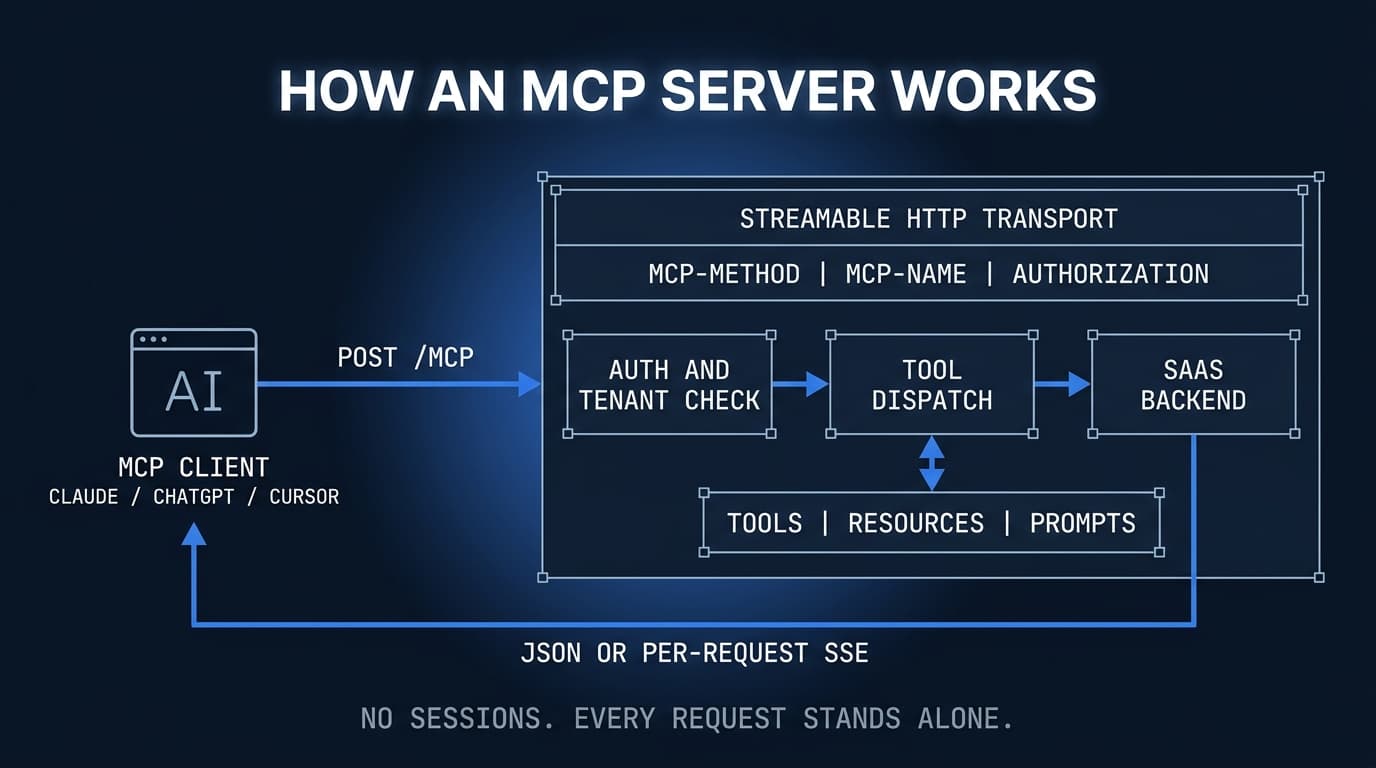
Architecting an MCP Server involves structuring the server's capabilities into three types of elements: tools, resources and prompts, each serving a distinct role in how agents interact with the system.
Tools: Actions Your Agent Can Invoke
Tools are the endpoints that mutate state (create_invoice, update_ticket, send_message, and so on).
Resources: Read-Only Context the Agent Can Pull
Resources, on the other hand, can provide the server's dashboards, resources, and even user accounts' raw data, and this can all be read without any side effects. It's this read/write separation that makes up the first layer of your security perimeter, with the read paths isolated from any write operations.
Prompts: Reusable Instruction Templates
Prompts are reusable instruction templates that the server defines and the client can list and fill in. A generate_monthly_report prompt, for example, packages the wording and the resource references that a recurring workflow needs, so the agent follows a known-good path instead of assembling one from scratch.
Stdio vs. Streamable HTTP: Choosing an MCP Transport
The choice of transport decides on the deployment topology of your application, and thus deserves more than just the developer's convenience to be considered.
Stdio Transport: Right for Local Dev, Wrong for Multi-Tenant SaaS
Stdio (i.e. your script writing to/from stdin/stdout) is the fastest way to get something up and running to test it out. There is no auth surface, it cannot serve multiple concurrent tenants, and it cannot sit behind a load balancer, but a prototype is exactly that: a prototype to test out ideas. Don't ever use it for real production work.
Streamable HTTP: The Production-Grade Default
The MCP 2026-07-28 spec defines Streamable HTTP as one POST endpoint that can return a JSON object or a per request SSE stream. This HTTP transport includes "Mcp-Method" and "Mcp-Name" headers on each request to enable a MCP gateway to rate-limit requests without needing to look at the content of the request. The core of the MCP protocol is stateless. Consequently there are no sticky sessions required. A remote MCP server thus can be scaled by distributing incoming requests in a round-robin fashion to a load balancer.
Migrating Off Legacy HTTP+SSE
The older HTTP+SSE transport is now deprecated under MCP deployment guidance. Legacy deployments should migrate off it to the single Streamable HTTP endpoint, which combines two previously separate HTTP connections, and does away with the previously persistent SSE channel, a major source of scaling headache.
Designing MCP Tools That AI Agents Actually Use Correctly
How your MCP tool design is called by an agent determines whether or not your tools will be used at all by that agent. The quality of the schema and the naming of the parameters is more critical than most teams realize.
Writing Tool Schemas That Guide Agent Reasoning
Tool descriptions should be used as prompt engineering to assist the agent to decide whether a tool is applicable or not. Thus descriptions for MCP tool should be precise (including description of all parameters: a 'required' array and a 'description' field for every parameter). For the same reason MCP JSON schema should support 'enum' constraints for parameters, to limit choice of the agent to the values that are valid for a given tool.
Naming Conventions: Why create_invoice Beats postInvoiceV2
Use snake_case (verb-noun) names for your MCP tool methods like get_customer and cancel_subscription. This will save you context budget, since every tool name and parameter name is spent out of the model's token budget on every call.
Handling Errors So Agents Can Self-Correct
The output from your tools must include a machine-readable error_code and a human-readable message. Agents use the error_code to decide whether or not to retry an action. Make sure non-idempotent actions are clearly documented so as to avoid double-triggering events that could result in additional, unintentional billing.
Building on the Official SDKs
The Tier 1 MCP SDKs for Python, TypeScript, Go and C# handle the framing of the protocol, capability negotiation, and stateless Streamable HTTP transport, so the work that remains is your own tool definitions. Validate every tool and the full auth flow with MCP Inspector before any agent traffic reaches the server.
MCP Authentication: OAuth 2.1, API Keys, and Tenant Isolation
Authentication for your remote servers exposed to AI agents is mandatory. The latest version of the spec, 2026-07-28, is aligned closely with OAuth / OpenID Connect and has deprecated Dynamic Client Registration in favor of Client ID Metadata Documents.
The MCP Auth Spec: OAuth 2.1 as the Recommended Standard
For remote servers OAuth 2.1 (including Authorization Code with PKCE and Client Credentials) must be used. If your SaaS already runs an authorization server the MCP client can automatically reuse a browser redirect. Token introspection or validation of a JWT must then however be implemented on the server.
Mapping OAuth Access Tokens to Tenants and Users
When a token isn't bound to a single tenant identity before any tool executes to perform work, multi-tenant MCP implementations will commonly fail. So, extract the tenant claim from the validated JWT or from MCP's token introspection endpoint. Reject any ambiguous tokens encountered on subsequent requests.
API Key Fallback: When It's Acceptable and How to Scope It Safely
API keys for internal tooling or single-tenant deployments are permitted under MCP security. Those keys must be restricted to specific tool subsets, to read only or write operations, and rotations to and from active key(s) scheduled.
Security Threat Model: What Can Go Wrong When AI Agents Call Your API
A threat model for MCP is different from a threat model for a API, since the caller is an autonomous agent instead of deterministic application code.
Prompt Injection via MCP Tool Responses: The Underrated Attack Vector
MCP prompt injection: A malicious string within a tool's response (e.g. a customer supplied field within a response from a tool) is interpreted by the MCP as the prompt to direct the next action of the agent. All values should be sanitized prior to return by a tool.
Scope Creep: Agents Calling Tools Outside Their Intended Workflow
Expose every tool behind an explicit allow-list tied to OAuth scopes, so an agent that wanders outside its intended workflow is refused at the server rather than trusted to stay within bounds.
Data Exfiltration Risks Through Resource Over-Exposure
Implement paginated resource endpoints to prevent MCP threats such as mass reads of users (e.g. "get all users"). Log all reads of resources. Require MRTR confirmation for actions that cannot be reversed.
Production Rollout: Versioning, Observability, and Rate Limiting for MCP Servers
A MCP server running in production will reveal failures that you had not encountered yet while testing MCP on your local box. All three aspects (versioning, tracing and rate limiting) have to be designed carefully before agent traffic reaches your backend.
Versioning Your MCP Server Without Breaking Existing Agent Integrations
As the MCP specification does not define a mechanism for versioning, URL-based versioning (e.g. /mcp/v1/) is recommended, keeping previous versions active after a breaking change. For a smooth rollout of a new MCP server it is further recommended to perform the rollout in shadow-mode before switching to 100% in a controlled cutover.
Logging and Tracing MCP Tool Calls for Debugging and Audit
MCP logging, as with the MCP Server itself, should be loggable at the level of a single tool call. Each log entry should contain the tenant ID, tool name, input hash (not the actual input), latency and result of the call. Distributed tracing via OpenTelemetry of the MCP Server itself, the internal API and database would be very useful as agent-driven failures are generally harder to reproduce than human-driven failures.
Rate Limiting Strategies That Protect Your Backend Without Breaking Agent Workflows
Rate limiting MCP Server connections is best implemented at two different scopes: per connection to prevent abuse by individual clients, and per tenant to protect SLA agreements for entire teams. Always supply a Retry-After header when sending a 429 to the client, otherwise the client will exponentially increase the number of requests in a thundering herd scenario.
From MCP Server to Full AI Agent Product: What to Build Next
But the tool layer also serves external agents: a great MCP server product also powers voice interfaces, customer-facing copilots and most importantly: reliable adoption numbers.
Combining MCP with Voice AI Agents for Multimodal Product Experiences
There's no need for a separate tool layer for Voice AI agents, as a Voice AI agent MCP pipeline can call the same tool definitions as a text-based agent. This means that, for example, voice-driven support bots and text-based coding assistants can be built as products using the same MCP backend without the need to re-architect.
Exposing MCP to Your Customers: The Embedded Agent Use Case
MCP customer-facing deployments allow users to connect their own AI client to products that have been integrated with MCP. Such a deployment doesn't require a team to build a proprietary user interface for a chat with an AI.
Measuring MCP Adoption: The Metrics That Matter for Product Teams
A health map for AI agents that are products comprises 5 signals: 1) the tool call volume per tool name, 2) error rate per tool, 3) the median latency, 4) the unique number of sessions per tenant per agent, and 5) the ratio of tool-originated API calls to those originated by humans. By tracking these early signs of problems with tools and over-loaded endpoints, teams can catch incidents before they occur.
Conclusion
Knowing how to build an MCP server also means knowing the basic architecture of the protocol, which due to its stateless core (revision 2026-07-28) differs fundamentally from most other session based protocols: There is no initialize handshake anymore, no session headers are stored on the server. All state is managed by the tool and returned as a handle to the server. The three capability types (tools, resources, prompts) as well as the Streamable HTTP transport, the OAuth 2.1 integration with CIMD, the Multi Round-Trip Requests for human confirmation as well as the structured versioning and observability all need to be taken into account when designing a production scenario for MCP. A simple round-robin load balancer without any sticky sessions is enough to scale a MCP server. There are several attack surfaces that need to be mitigated explicitly before a server can be deployed to the public Internet: prompt injection, over-permissioned tools and tenant data bleed. First start by picking one of the four Tier 1 SDKs. Then write a single, very scoped tool. Validate the full auth flow with MCP Inspector before you add more surface area to what you've already written. Teams that would rather ship the agent layer alongside the product itself can work with an AI engineering partner that has already taken an AI MVP from prototype to production.
FAQ
How long does it take to build an MCP server for a production SaaS product?
A simple MCP Server for a handful of Tools can be set up quickly with the official Python or TypeScript SDK. A production-grade implementation, however, requires OAuth 2.1, tenant isolation, rate limiting, API versioning and observability on top of the basic MCP Server.
What is the difference between stdio and HTTP transport in MCP server architecture?
For local development (the "normal" use case for Cursor extensions), the MCP server can simply run as a local subprocess in stdio transport mode. But for multi-tenant SaaS, where all your AI agents connect over the internet, you need to expose your MCP server as a remote network endpoint. For production use, this remote HTTP transport mode is simply required to ensure proper authentication, support for horizontal scaling, and distributed logging. Running your MCP server in stdio transport mode in production is a serious architectural mistake with significant security implications.
Does MCP authentication support multi-tenant SaaS applications?
Yes. The Model Context Protocol supports OAuth 2.1 as its default for authentication to MCP Endpoints. There is also support for API Keys, where care is required to ensure that API Keys are restricted to single user accounts and then changed regularly. Tenant isolation must be enforced at the MCP server layer, not just the underlying API, because AI agents can craft unexpected tool call sequences that bypass application-level guards.
Why do AI agents like Claude or ChatGPT fail to use MCP tools correctly?
The most common issues with MCP tools stem from poor design. If the name of a tool is ambiguous, the input schema too open or the description too vague for the language model to make correct assumptions about how and when to use it, problems occur. Tools that execute many side effects in a single call to it, such as creating and sending an e-mail, make it difficult for planning modules to plan around the call to the tool. Follow a single-responsibility when designing MCP tools. Use strict JSON Schema validation and be sure to document preconditions, a description of the expected output and possible errors in the tool.